

Avslutt
0
10
20
30
40
50
60
70
80
90
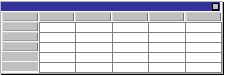
x
4
5
3
2
1
A
B
C
D
Øst
Vest
Nord
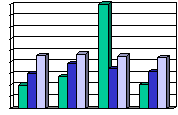
20.4
27.4
90
20.4
30.6
38.6
34.6
31.6
45.9
46.9
45
43.9
42
Tilpasse presentasjonen
Side 5 av 10
Tilpasse din første presentasjon
Legge til skjemaer
ü
Sett inn et nytt lysbilde, og
velg et oppsett med
skjema.
ü
Dobbeltklikk plassholderen
for skjemaet for å lage et
eget skjema.
ü
Erstatt eksempeldataene
med egne data.
ü
Klikk utenfor skjemaet på
lysbildet for å gå tilbake til
PowerPoint.
ü
Dobbeltklikk skjemaet for å
redigere det på nytt.
This slide uses the 2-Column Text AutoLayout.
The art was all created using PowerPoint drawing tools.
Animation effects were used to simulate typing the sample data with new numbers and showing the corresponding graph bar growing as a result.
Learn more about these features by typing these words in the Office Assistant to go to the corresponding help topic:
Drawing
Animation